A few months ago, I audited an outbound sales team that had three full-time BDRs dialing cold lists.
On paper, their activity numbers looked decent. But when we dug into their CRM, we found chaos:
- 420 fresh leads imported from Apollo.io sat unassigned for eleven days.
- Two reps accidentally called the same VP of Engineering in the same afternoon.
- Active sequences kept blasting automated emails to prospects who had already agreed to a demo.
When your outbound team operates manually, you are leaking qualified pipeline every single day. Here is how to configure automated HubSpot workflows that integrate with Apollo.io, Zoho CRM, and Salesforce to keep your sales engine humming.
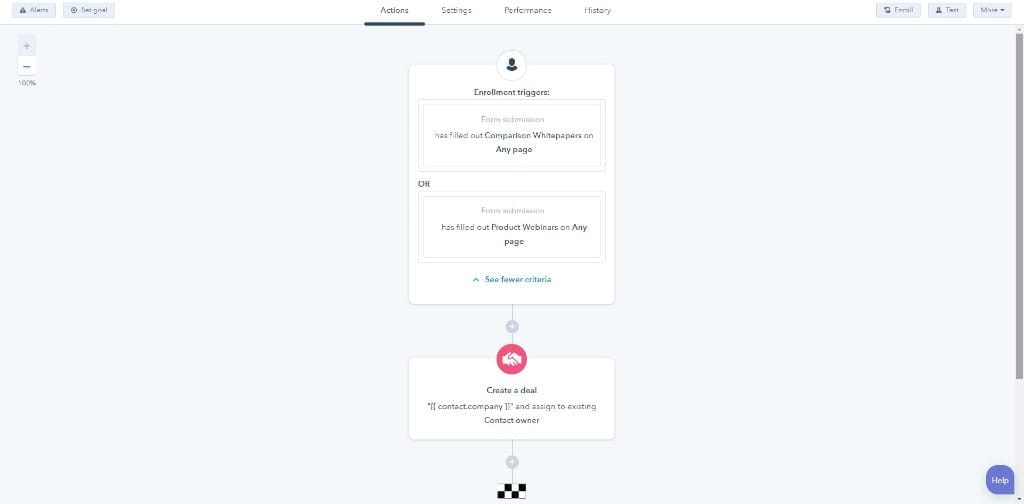
Step 1: Clean Up Lifecycle Stages Before Building Workflows
Do not touch the workflow builder until your lifecycle stages accurately mirror your outbound funnel. In HubSpot Settings, configure these four core stages:
- Cold Prospect: Target accounts matching your ICP with zero previous engagement.
- Engaged Lead (MQL): Prospects who opened multiple sequence emails or clicked an asset link.
- Sales Qualified Lead (SQL): Prospects who replied positively or completed a phone discovery call.
- Opportunity: Qualified accounts that have an active discovery meeting scheduled on the calendar.
Step 2: Automated Lead Rotation & Task Dispatch
When a fresh list of verified contacts is imported from Apollo.io or Zoho CRM, you need immediate round-robin distribution to prevent leads from sitting cold.
The Workflow Configuration:
- Enrollment Trigger: Contact Property "Lifecycle Stage" is equal to "Cold Prospect" AND "Contact Owner" is unknown.
- Action 1: "Rotate Record to Owner" (Select your active BDR user team).
- Action 2: "Create Task" -> "Execute Day 1 Multi-Channel Sequence" (Due in 24 hours, High Priority).
- Action 3: "Send Internal Notification" (Ping the assigned rep in Slack or email).
Step 3: Building the 3x3 Multi-Channel Sequence Loop
An effective outbound workflow coordinates automated email with manual phone and LinkedIn touches using platforms like RingCentral:
- Day 1: Automated Email 1 (PAS Framework) + Manual LinkedIn Profile Task
- Day 3: Manual Phone Call Task (Permission-Based Opener from our Top 7 Frameworks)
- Day 4: Automated Email 2 (Threaded Reply with Case Study Metric)
- Day 7: Manual Phone Call Task (Late-Afternoon Window)
- Day 9: Automated Breakup / Final Value Touch
Step 4: The Master Un-Enrollment Safety Net
The fastest way to destroy brand credibility is sending an automated "Just following up!" email to a founder who scheduled a meeting with your Account Executive yesterday.
In your Master Workflow settings, configure automated un-enrollment triggers:
- Contact replies to any email thread in the sequence.
- BDR logs call outcome as "Connected, Meeting Booked".
- Contact Lifecycle Stage changes to "Opportunity".
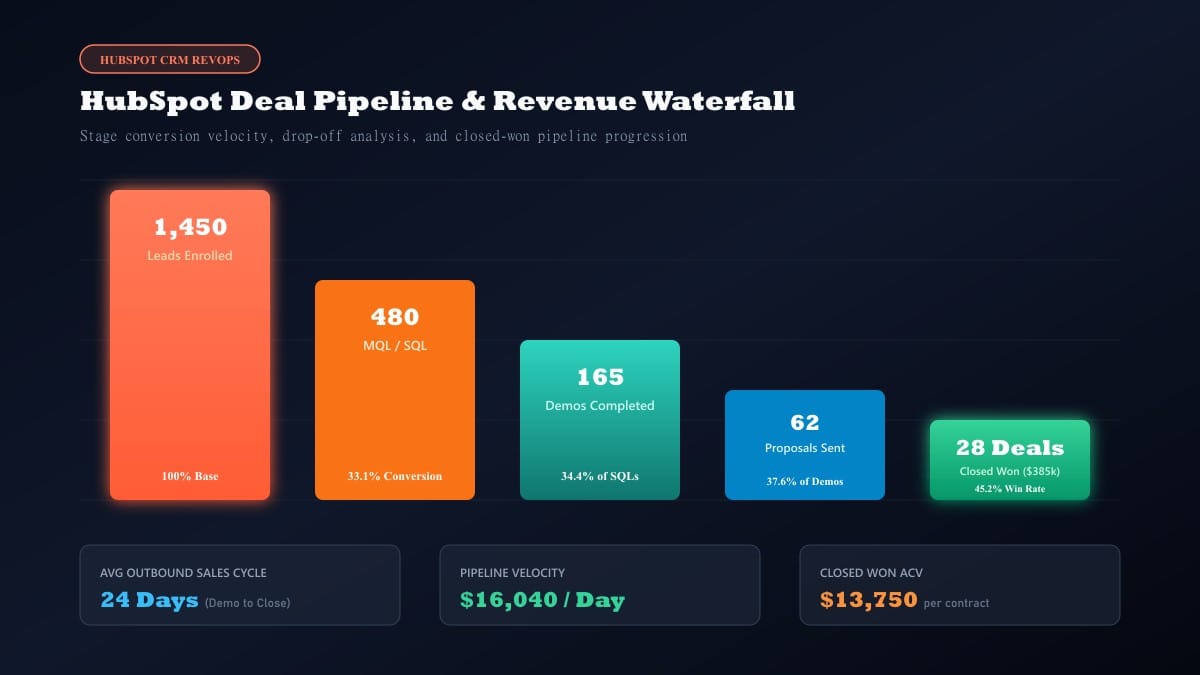
Step 5: Key Outbound Metrics to Monitor Weekly
Forget vanity metrics like raw email open rates (which Apple privacy protections inflate). Track these operational numbers instead:
- Dial-to-Connect Ratio: Are your direct dials reaching human decision-makers? (Target: 4% to 8%).
- Positive Reply Rate: Are your email hooks generating commercial interest? (Target: 3% to 6%).
- Show-Up Rate: Are scheduled meetings actually attending the demo? (Target: 70%+).
Need Your CRM Workflows Built & Managed?
Setting up seamless data routing between Apollo, HubSpot, and outbound dialers requires technical RevOps experience.
Take a look at my services and background or schedule a quick chat to see how we can optimize your outbound CRM architecture.